Project Ogre Part 4: Training a Mecanum Controller in Isaac Lab
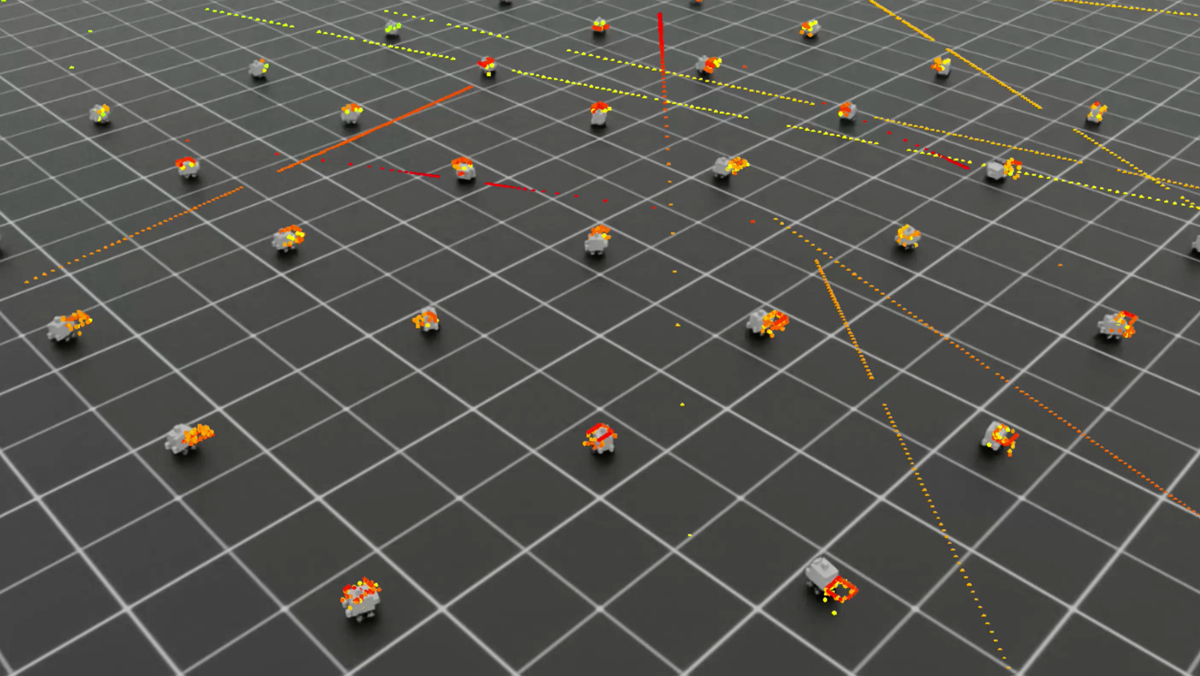
Training in Isaac Lab
This is Part 4 of the Project Ogre series. In Part 3, we built maps using SLAM. Now we'll train a neural network to optimally control the mecanum wheels using reinforcement learning in NVIDIA Isaac Lab.
Project Goal: Train an RL policy that converts velocity commands (vx, vy, vtheta) into optimal wheel velocities, learning the robot's real dynamics.
📦 Full Source Code: Training environment and scripts are available at github.com/protomota/ogre-lab
The video below shows Isaac Lab training 4096 parallel instances of the robot simultaneously. Each instance learns from its own experiences, accelerating the training process dramatically compared to single-environment training.
Why Use Reinforcement Learning?
Mecanum wheel kinematics have a clean theoretical model: given a desired body velocity (vx, vy, angular), you can compute the required wheel velocities using inverse kinematics. So why train a neural network?
The theory doesn't match reality.
Real robots have:
- Wheel slip on different surfaces
- Motor response delays and non-linearities
- Weight distribution asymmetries
- Mechanical imperfections in wheel alignment
An RL policy learns to compensate for these factors by experiencing thousands of trials in simulation. It discovers that "to go straight forward at 0.3 m/s, the right wheels need slightly higher velocity to compensate for weight imbalance."
The trained policy sits between Nav2's velocity commands and the actual wheel controllers, translating ideal commands into commands that achieve the desired behavior on the real robot.
Isaac Lab Architecture
Isaac Lab is NVIDIA's GPU-accelerated robot learning framework built on Isaac Sim. Key features:
- Parallel environments: Train on 1024+ robots simultaneously
- GPU physics: PhysX runs entirely on GPU for massive speedup
- RSL-RL integration: Works with the RSL-RL library for PPO training
The training loop runs at ~30Hz control rate with 120Hz physics, training policies in minutes rather than hours.
The Training Environment
The environment is defined in ogre_navigation_env.py. Let's break down the key components:
Observation Space (10 dimensions)
The policy sees:
| Index | Description |
|---|---|
| 0-2 | Target velocity command (vx, vy, vtheta) |
| 3-5 | Current base velocity (vx, vy, vtheta) |
| 6-9 | Current wheel velocities (fl, fr, rl, rr) |
This gives the policy enough information to understand both what it should achieve and what the robot is currently doing.
Action Space (4 dimensions)
The policy outputs wheel velocity targets for all four wheels:
- Front-left (FL)
- Front-right (FR)
- Rear-left (RL)
- Rear-right (RR)
Raw policy outputs are in [-1, 1] and scaled by action_scale (8.0 rad/s in the working config) to get actual wheel velocities.
Reward Function
The policy learns through reward signals:
# Main velocity tracking reward
vel_error = target_vel - current_vel
rew_vel_tracking = 2.0 * exp(-vel_error_norm / 0.25)

# Uprightness reward (+1 upright, -1 flipped)
rew_uprightness = 1.0 * up_z

# Wheel symmetry penalty (prevents veering during straight motion)
rew_symmetry = -1.0 * (left_avg - right_avg)^2
The velocity tracking reward uses exponential decay - perfect tracking gives maximum reward, with diminishing returns as error increases. The symmetry penalty discourages the policy from commanding asymmetric wheel velocities when the target is straight-line motion.
Episode Structure
- Duration: 10 seconds per episode
- Termination: Episode ends early if robot flips (base height < 0.02m)
- Reset: Random target velocities sampled each episode
Random targets force the policy to generalize across the full velocity space rather than memorizing a single trajectory.
Robot Configuration
The USD robot model must match the real hardware:
OGRE_MECANUM_CFG = ArticulationCfg(
    spawn=sim_utils.UsdFileCfg(
        usd_path="~/ros2_ws/src/ogre-slam/usds/ogre_robot.usd",
    ),
    init_state=ArticulationCfg.InitialStateCfg(
        pos=(0.0, 0.0, 0.04),  # Wheel axle height
    ),
    actuators={
        "wheels": ImplicitActuatorCfg(
            joint_names_expr=["fl_joint", "fr_joint", "rl_joint", "rr_joint"],
            effort_limit=10.0,
            stiffness=0.0,
            damping=10.0,
        ),
    },
)
Key parameters:
wheel_radius: 0.040m (40mm)wheelbase: 0.095m (95mm)track_width: 0.205m (205mm)
The Wheel Sign Challenge
One non-obvious issue: the USD model has the right wheels (FR, RR) with opposite joint axis orientation from the left wheels. Sending [+10, +10, +10, +10] to all wheels makes the robot spin instead of moving forward.
The solution is sign correction applied in both training and deployment:
Training (_apply_action):
corrected_actions = self.actions.clone()
corrected_actions[:, 0] *= -1  # FR (right wheel)
corrected_actions[:, 1] *= -1  # RR (right wheel)
self.robot.set_joint_velocity_target(corrected_actions)
Deployment (Isaac Sim action graph): The same correction must be applied when running the trained policy - multiply FR and RR velocities by -1.
This creates a normalized action space where [+,+,+,+] always means "all wheels forward" regardless of joint axis conventions.
Running Training
Prerequisites
- Isaac Sim 5.0+
- Isaac Lab installed at
~/isaac-lab/IsaacLab - Conda environment
env_isaaclab
Step 1: Sync the Environment
The training environment must be copied to Isaac Lab's task directory:
cd ~/ogre-lab
./scripts/sync_env.sh
This copies ogre_navigation/ to Isaac Lab's source tree where it can be discovered and imported.
Step 2: Run Training
conda activate env_isaaclab
cd ~/ogre-lab
./scripts/train_ogre_navigation.sh
Default settings:
- 4096 parallel environments
- 1000 iterations
- Headless mode (no visualization)
For debugging, run with fewer environments and visualization:
./scripts/train_ogre_navigation.sh 64 100
Step 3: Monitor with TensorBoard
TensorBoard provides real-time visualization of training progress. In a separate terminal:
conda activate env_isaaclab
tensorboard --logdir ~/isaac-lab/IsaacLab/logs/rsl_rl/ogre_navigation/
Open http://localhost:6006 in your browser:

Key metrics to watch:
-
Train/mean_reward: The average reward across all parallel environments. Should steadily increase as the policy learns. A healthy training run shows rewards climbing from near-zero to positive values.
-
Train/mean_episode_length: How long episodes last before termination. Should approach the maximum (300 steps = 10 seconds at 30Hz). If episodes are short, robots are flipping or hitting termination conditions.
-
Loss/value_function: The critic's prediction error. Should decrease over time as the value network learns to estimate expected returns. Spikes are normal early in training.
-
Loss/surrogate: The PPO policy loss. Fluctuates during training but should generally trend downward.
TensorBoard is invaluable for diagnosing training issues. If rewards plateau, you might need to adjust reward weights. If episode lengths stay low, the action scale might be too aggressive.
What to Expect
Learning iteration 50/100
  Mean reward: 1.25        # Positive and increasing = good
  Mean episode length: 299  # Near 300 = robots staying upright
If rewards are very negative (-20000), the velocity targets are too aggressive - reduce max_lin_vel and max_ang_vel. If episode lengths are short, robots are flipping - reduce action_scale.
Exporting the Trained Policy
Once training completes, export the model for deployment:
cd ~/ogre-lab
./scripts/export_policy.sh
This runs Isaac Lab's play.py to verify the policy works, then exports:
policy.onnx- For ONNX runtime inferencepolicy.pt- PyTorch JIT format
The exported models go to the training run's exported/ directory.
Deploying to ROS2
Copy the trained model to the ROS2 workspace:
./scripts/deploy_model.sh --rebuild
This copies the latest exported model to ogre-slam/ogre_policy_controller/models/ and rebuilds the ROS2 package.
Testing in Isaac Sim
Terminal 1: Isaac Sim
- Load
ogre.usd - Press Play
Terminal 2: Policy Controller
conda deactivate  # Exit conda - ROS2 uses system Python
source ~/ros2_ws/install/setup.bash
ros2 launch ogre_policy_controller policy_controller.launch.py
Terminal 3: Test Commands
# Forward motion (0.3 m/s)
ros2 topic pub /cmd_vel_smoothed geometry_msgs/msg/Twist \
  "{linear: {x: 0.3, y: 0.0, z: 0.0}, angular: {x: 0.0, y: 0.0, z: 0.0}}" -r 10

# Strafe left
ros2 topic pub /cmd_vel_smoothed geometry_msgs/msg/Twist \
  "{linear: {x: 0.0, y: 0.3, z: 0.0}, angular: {x: 0.0, y: 0.0, z: 0.0}}" -r 10

# Rotate
ros2 topic pub /cmd_vel_smoothed geometry_msgs/msg/Twist \
  "{linear: {x: 0.0, y: 0.0, z: 0.0}, angular: {x: 0.0, y: 0.0, z: 1.0}}" -r 10
Watch the robot in Isaac Sim. It should move smoothly in the commanded direction.
The Data Flow
Nav2 Planner → /cmd_vel → Policy Controller → /joint_command → Isaac Sim/Robot
                               ↓
                         policy.onnx
                               ↓
                    [FL, FR, RL, RR] wheel velocities
The policy controller subscribes to /cmd_vel_smoothed, runs the velocity command through the neural network, and publishes individual wheel velocities to /joint_command.
Troubleshooting Training
Robots Exploding/Flying
Cause: Physics instability, usually from collision issues or excessive forces
Solutions:
- Check USD model has proper collision meshes
- Reduce
action_scale(try 6.0 instead of 8.0) - Increase physics solver iterations
Very Negative Rewards
Cause: Velocity targets exceed what the robot can achieve
Solutions:
- Reduce
max_lin_velandmax_ang_vel - Check
action_scaleallows sufficient wheel velocity
Short Episode Lengths
Cause: Robots flipping over
Solutions:
- Reduce
action_scale - Add stronger uprightness reward
- Check wheel friction parameters
Policy Doesn't Generalize
Cause: Training converged to local minimum
Solutions:
- Increase training iterations
- Add curriculum learning (start easy, increase difficulty)
- Tune reward scales
Quick Reference
Key Files
| File | Location | Purpose |
|---|---|---|
ogre_navigation_env.py | ogre-lab/isaaclab_env/ | Training environment |
rsl_rl_ppo_cfg.py | ogre-lab/isaaclab_env/agents/ | PPO hyperparameters |
policy.onnx | ogre-slam/ogre_policy_controller/models/ | Deployed model |
policy_controller_node.py | ogre-slam/ogre_policy_controller/ | ROS2 inference node |
Commands
# Train policy
./scripts/train_ogre_navigation.sh

# Export trained model
./scripts/export_policy.sh

# Deploy to ROS2
./scripts/deploy_model.sh --rebuild

# Run policy controller
ros2 launch ogre_policy_controller policy_controller.launch.py
What's Next
With a trained policy deployed, Part 5 brings everything together with Nav2 navigation. The policy controller integrates seamlessly - Nav2 plans paths and generates velocity commands, the RL policy executes them optimally, and the robot navigates autonomously through the mapped environment.