
Protomota
A one-person lab for AI automation, custom AI agents, and apps that ship. Tell me the task that eats your week, and I'll build the AI that does it.
AI automation
I build AI agents and automations that take repetitive work off your team, plus the apps around them. Free call and custom quote.
Apps
Apps I build and use myself. Jotley and PulseCanvas are free, source available, and out now. Inkspring and OpenTalon are coming soon.
Your apps. Your AI agents.
Bring your notes, writing, and tasks into Claude or Codex. Explore each app's MCP connection, setup, and current availability.
OpenTalon
Read your board, update tasks, and keep progress in one place.
App coming soon · MCP previewMac MCP connections are in preview or development. OpenTalon and Inkspring are coming soon. See each setup guide before installing.

Jotley
Free · Source available · Out now
Talk, or play anything, and get a transcript and a summary, all on your device.
Jotley transcribes speech live and creates summaries on your device with Apple Intelligence. After Apple's model setup, it works offline. On a Mac it can transcribe audio from any app, like a call or a video, alongside your microphone. On iPhone and iPad it transcribes your voice as you speak. No audio recordings are saved.
Your notes stay on your device and in your own iCloud. Built-in transcription and Apple Intelligence run on your device. If you enable the optional Mac MCP connection, text you share with an agent may be sent to its AI provider.
- LocalApple Intelligence
- Offlineno internet needed
- Yourskept in your iCloud
- Export bug fixed, tested at 4K
- Onboarding screen is next
- New icons due Thursday

PulseCanvas Studio
Free · Source available · Out now
Turn a song into a music-synced video on Mac, iPhone, iPad and Apple Vision Pro.
Drop in a soundtrack and PulseCanvas finds the beat, splits the song into sections, and plays visuals in time with the music: hundreds of visualizers of its own plus thousands of MilkDrop effects. Shape the colors and motion, then export an MP4 in wide, portrait, phone, or square formats, up to 4K at 60 frames per second.
- Hundredsnative visualizers
- ThousandsMilkDrop effects
- 4KMP4 export
Clips from a song exported with PulseCanvas Studio.

Inkspring
Free · Coming soon
Find your niche, research it, and write posts and carousels in your own voice.
Inkspring is a desktop studio for research and writing. Keep your own notes and references, pull in public Instagram posts or research X, then shape it all into posts and carousels that sound like you. Connect X, Instagram, LinkedIn, or Reddit and review each post before it goes out.
Your projects, research, and drafts stay on your computer. There's no Inkspring account and no cloud sync. Pick Claude or OpenAI and use your own API key, so your brief goes straight to that provider.
The Mac version is being tested now. Windows and Linux are planned.
- Localprojects on your computer
- Your keyClaude or OpenAI
- Reviewbefore anything posts
- NoteLeft rear wheel slips on the rug
- XThreads on mecanum wheel slip
- InstagramPublic posts tagged #mecanum

Coming soon
Your work, on one local board.
OpenTalon is a personal Kanban app for keeping tasks, priorities, due dates, and progress together on your Mac. Work manually, or send a task to Claude Code or Codex when you want an agent to help.
Its local MCP connection lets your agent read and update the board. Comments, screenshots, and completion evidence keep the result attached to the task. The Mac app is in private preview.
- Localyour board on your Mac
- Your choiceClaude Code or Codex
- Proofprogress on the task

One person. One board.
Websites & web apps
Sites and web apps I've designed, built, and run.
AI ResourcePRO
Free · Live now
Learn AI by building with it.
AI Resource Pro is my free tutorial site for people who use AI to get real work done. Every lesson walks through the exact steps: the prompts, the settings, and the commands I actually ran.
It covers Claude, ChatGPT and Codex, agents that click and type on a real computer, and AI video with models you run on your own GPU. Most tutorials come with a full video walkthrough on YouTube.
- Freeevery tutorial
- Stepsexact prompts and commands
- Videowalkthroughs on YouTube


Experiments
The things I build for fun have their own page now.


Writing
Build logs and notes, published on Substack.
- Nov 8, 2026A Subscription Needs a Bill Behind It
- Nov 6, 2026I Took the Server Out
- May 31, 2026Project Ogre Part 5: Autonomous Navigation with Nav2
- May 31, 2026Project Ogre Part 4: Training a Mecanum Controller in NVIDIA Isaac Lab
- May 31, 2026Project Ogre Part 3: Building Maps with SLAM
Video & motion
Music videos, reels, and motion graphics have their own page now, and I post every new video on my YouTube channel.


About
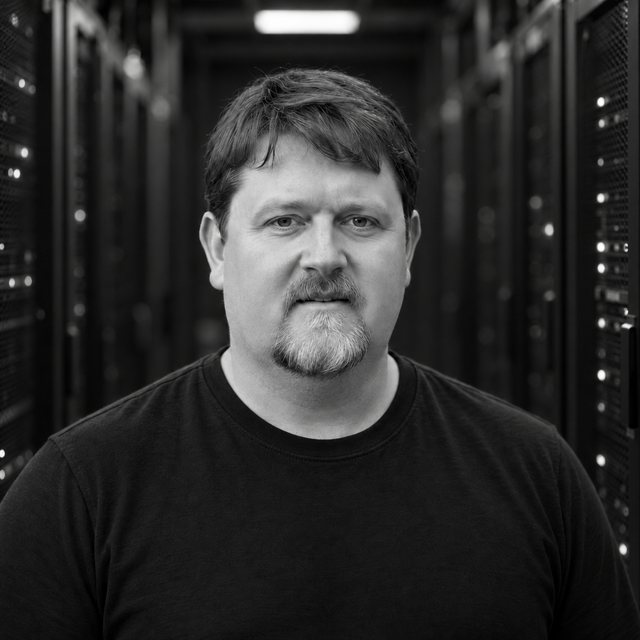
I'm Brad Dunlap, an engineer in Florida.
By day I'm a Digital Solution Consultant Associate Director at Launch by NTT Data. Protomota is where everything else happens: the apps and videos above, small robots on the living room floor, simulations of those robots, home automation around the house, and whatever is on the 3D printer this week.
I try to automate as much of my day-to-day as I can with AI SI. My robots are all small ones for now, but I'd like a real one around the house someday.
What I learn along the way goes into AI Resource Pro, free hands-on tutorials for Claude, ChatGPT and Codex, computer-use agents, and AI video on your own GPU.
Want more information?
A task you'd like to automate, an AI agent you have in mind, or a question about an app. Send a note and I'll reply by email.
Open to business opportunities as well.
A coffee for the next build?
If something here was useful, or just fun to watch, you can buy me a coffee to help keep it going.
Tips are optional. Jotley and PulseCanvas stay free and source available.